

Rynko vs Puppeteer for PDF Generation: Architecture, Performance, and Tradeoffs
Puppeteer is the default choice for programmatic PDF generation, and for good reason — it's free, flexible, and backed by Google. But there's a fundamental architectural question worth asking before you commit: should your PDF pipeline depend on a browser at all?
Puppeteer comes up in almost every conversation about PDF generation. It's battle-tested, well-documented, and most developers already know HTML and CSS. When I started building Rynko, I didn't set out to replace Puppeteer — I set out to solve a different problem. But the two tools end up on the same shortlists, so it's worth laying out where they overlap, where they diverge, and when each one makes sense.
How They Work (Side by Side)
The architectural difference between Puppeteer and Rynko isn't just an implementation detail — it drives almost every other tradeoff between the two.
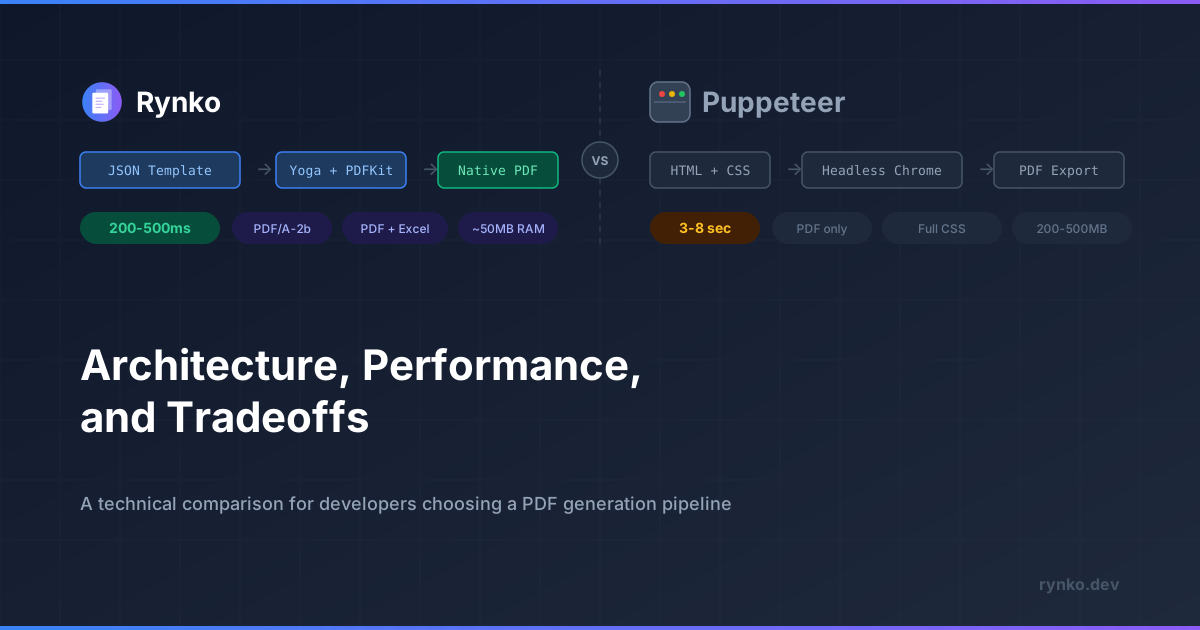
Puppeteer's pipeline looks like this: your application generates HTML (usually from a template engine like Handlebars or EJS), launches a headless Chrome instance, loads the HTML into a page, waits for rendering to complete, and calls page.pdf() to export the result. The PDF you get is essentially a print of a web page.
HTML + CSS → Headless Chrome → Page Render → PDF Export
Rynko's pipeline skips the browser entirely. Templates are defined as a structured JSON component tree — not HTML. The Yoga layout engine (the same flexbox engine that powers React Native) computes every element's position, and PDFKit writes native vector primitives directly to the PDF. Text is rendered as searchable glyphs, charts as Bezier paths, fonts are embedded.
JSON Template + Variables → Yoga Layout → PDFKit → Native PDF
The key insight: Puppeteer renders a browser page and then exports it. Rynko builds the PDF directly, with no intermediate rendering step. This distinction shows up in performance, resource usage, deployment complexity, and output consistency.
The Performance Gap
I'll be upfront — performance is where the difference is most dramatic, and the numbers aren't close.
Generation speed. A typical Puppeteer document takes 3–8 seconds to generate. That includes Chrome startup (or page creation if you're reusing a browser instance), HTML rendering with CSS layout, font loading, and the PDF export step. Rynko generates the same document in 200–500ms. The Yoga layout pass is fast because it's computing flexbox positions in native code, and PDFKit writes PDF primitives without a browser rendering step in between.
Memory. Each Chrome instance needs 200–500MB of RAM. If you're generating documents concurrently, that adds up fast — 10 concurrent PDFs can consume 2–5GB. Rynko's workers use roughly 50MB each, because there's no browser process to keep alive.
Serverless reality. This is where Puppeteer hits its hardest wall. AWS Lambda has a 250MB deployment package limit — Chrome alone is roughly 280MB compressed. Cold starts add 5–15 seconds on top of the generation time. Most teams that start with Puppeteer on Lambda eventually move to dedicated instances, which changes the cost equation significantly. Because Rynko's renderer has no browser dependency, it fits comfortably in serverless environments without special packaging or layer configurations.
Rynko | Puppeteer | |
|---|---|---|
Generation speed | 200–500ms | 3–8s |
Memory per document | ~50MB | 200–500MB |
Serverless-friendly | Yes | Difficult (Chrome size, cold starts) |
Concurrent generation | Low memory overhead | Limited by RAM |
Infrastructure | No browser dependency | Chrome must be installed |
What Puppeteer Does Better
I want to be fair about this, because Puppeteer has real strengths that matter for certain use cases.
Full CSS support. Puppeteer renders in a real browser, which means you get the complete CSS specification — grid, flexbox, animations (for screenshots), web fonts via @font-face, media queries, and CSS @page rules. Rynko's layout engine supports flexbox-style positioning through Yoga, but it's not a browser. If your templates rely heavily on CSS grid or advanced selectors, Puppeteer handles that natively.
Existing HTML templates work as-is. If you have a Handlebars, EJS, or React-based template pipeline that's already producing the HTML you want, Puppeteer plugs directly into it. No conversion, no new template format. That's a real advantage when you've already invested in HTML templates.
URL-to-PDF and screenshots. Puppeteer can navigate to a URL and export what it sees. That's useful for capturing web pages, generating screenshots of dashboards, or turning existing web content into PDFs without modifying the source. Rynko doesn't do this — it generates documents from structured templates, not from URLs.
Mature ecosystem. Puppeteer has been around since 2017. It has extensive documentation, a large community, hundreds of Stack Overflow answers, and well-understood patterns for common problems. When something goes wrong, you'll find someone who's already solved it.
Free and open source. There's no subscription, no usage limits, no vendor dependency. You own the entire pipeline.
What Rynko Does Better
Speed and resource efficiency. As covered above, the performance gap is significant. For latency-sensitive workloads — a user clicks "Download Invoice" and waits — 200ms vs 5 seconds is the difference between a smooth experience and a loading spinner.
PDF and Excel from the same template. This is the biggest practical difference. Puppeteer generates PDFs only. If you also need Excel output — and most business applications eventually do — you're building and maintaining a completely separate pipeline with a library like ExcelJS. With Rynko, you design one template and generate both formats from the same API call by changing a single parameter.
// Same template, same data — just change the method
const pdf = await rynko.documents.generatePdf({
  templateId: 'invoice',
  variables: invoiceData,
});

const excel = await rynko.documents.generateExcel({
  templateId: 'invoice',
  variables: invoiceData,
});
Visual designer for non-developers. Templates are designed in a web-based drag-and-drop editor. Product managers, finance teams, and operations people can update a template without a code deploy. With Puppeteer, every layout change — moving a logo, adjusting a font size, adding a column — requires a developer to modify HTML.
28 built-in component types. Tables, charts (8 types), QR codes, barcodes, 9 interactive PDF form field types (text inputs, checkboxes, dropdowns, digital signatures), conditional blocks, loops, and key-value layouts. These are first-class components with property schemas validated at design time, not HTML you have to build and style yourself.
AI template creation via MCP. Rynko provides an MCP server that lets AI agents like Claude Desktop, Cursor, or any MCP-compatible client create templates and generate documents through conversation. The structured JSON schema gives the AI a well-defined contract to work against — it can't produce broken HTML or invalid CSS because the schema is validated before it reaches the renderer. This is a fundamentally different situation from asking an LLM to generate valid HTML templates, where broken tags and layout issues are common and hard to catch before rendering.
No browser dependency. No Chrome to install, no Puppeteer version to pin, no --no-sandbox flags in Docker, no Chromium packages to maintain in your CI/CD pipeline. The renderer is a Node.js library with no native browser dependencies.
Zero XSS surface. Templates are JSON, not HTML. There's no innerHTML, no script injection vector, no CSS expression() attack surface. The expression evaluator uses a strict allowlist — arithmetic, comparisons, Math.* functions, and safe array methods like .map(), .reduce(), .filter(). Calls to eval(), require(), prototype access, and template literals are blocked at the syntax level.
Deterministic rendering. This is one the biggest strengths of Rynko. The same template and data produce identical output regardless of the host environment. There's no CSS cascade, no browser rendering differences between your development machine and a Linux container in production. Chrome version updates can't silently change your document output.
The Excel Question
This deserves its own section because it's the single most common reason teams switch from Puppeteer to Rynko.
Puppeteer generates PDFs. That's it. When your finance team asks for an Excel version of the same invoice, or your clients need spreadsheet exports they can manipulate, you're building a second generation pipeline. That typically means ExcelJS or SheetJS, with its own template logic, its own styling code (cell-by-cell formatting, manual column widths), and its own maintenance burden. Two codebases for the same document.
// With Puppeteer, you need two completely separate pipelines:

// Pipeline 1: PDF via Puppeteer
const browser = await puppeteer.launch();
const page = await browser.newPage();
await page.setContent(invoiceHtml);
const pdf = await page.pdf({ format: 'A4' });
await browser.close();

// Pipeline 2: Excel via ExcelJS (separate library, separate logic)
const workbook = new ExcelJS.Workbook();
const sheet = workbook.addWorksheet('Invoice');
sheet.columns = [
  { header: 'Description', key: 'description', width: 30 },
  { header: 'Qty', key: 'qty', width: 10 },
  { header: 'Price', key: 'price', width: 15 },
];
invoice.items.forEach(item => sheet.addRow(item));
// Now manually style every cell, add borders, format numbers...
await workbook.xlsx.writeFile('invoice.xlsx');
With Rynko, it's the same template, the same API, the same data. The rendering engine handles format-specific output — tables become Excel sheets with proper column types, number formatting carries over, charts render natively in both formats. When you update the template, both outputs update together.
If your application only ever needs PDF, this isn't a factor. But in my experience building enterprise systems, Excel comes up eventually — and rebuilding later is significantly more expensive than choosing a tool that handles both from the start.
Code Comparison: Generating an Invoice
Here's what generating the same invoice looks like with each tool, end to end.
Puppeteer
import puppeteer from 'puppeteer';
import Handlebars from 'handlebars';

// Step 1: Define your HTML template (or load from a file)
const templateSource = `
<html>
<style>
  body { font-family: Arial; padding: 40px; }
  table { width: 100%; border-collapse: collapse; margin-top: 20px; }
  th { background: #f4f4f4; text-align: left; }
  th, td { padding: 8px; border-bottom: 1px solid #ddd; }
  .total { font-weight: bold; text-align: right; margin-top: 20px; font-size: 18px; }
  .header { display: flex; justify-content: space-between; }
</style>
<body>
  <div class="header">
    <div>
      <h1>{{companyName}}</h1>
      <p>{{companyEmail}}</p>
    </div>
    <div>
      <h2>Invoice #{{invoiceNumber}}</h2>
      <p>Date: {{invoiceDate}}</p>
    </div>
  </div>
  <p>Bill to: {{clientName}}</p>
  <table>
    <thead>
      <tr><th>Description</th><th>Hours</th><th>Rate</th><th>Amount</th></tr>
    </thead>
    <tbody>
      {{#each lineItems}}
      <tr>
        <td>{{description}}</td>
        <td>{{hours}}</td>
        <td>${{rate}}</td>
        <td>${{multiply hours rate}}</td>
      </tr>
      {{/each}}
    </tbody>
  </table>
  <p class="total">Total: ${{total}}</p>
</body>
</html>
`;

// Step 2: Compile and render the HTML
Handlebars.registerHelper('multiply', (a, b) => a * b);
const template = Handlebars.compile(templateSource);
const html = template(invoiceData);

// Step 3: Launch Chrome, render, and export
const browser = await puppeteer.launch({
  args: ['--no-sandbox', '--disable-setuid-sandbox'],
});
const page = await browser.newPage();
await page.setContent(html, { waitUntil: 'networkidle0' });
const pdf = await page.pdf({
  format: 'A4',
  printBackground: true,
  margin: { top: '20mm', bottom: '20mm', left: '15mm', right: '15mm' },
});
await browser.close();
You're responsible for: the HTML template, the CSS styling, Handlebars helpers for calculations, Chrome lifecycle management, and error handling when Chrome crashes or runs out of memory.
Rynko
import { Rynko } from '@rynko/sdk';

const rynko = new Rynko({ apiKey: process.env.RYNKO_API_KEY! });

// Template is designed in the visual editor — layout, styling,
// and calculated fields (subtotals, tax) live in the template
const job = await rynko.documents.generatePdf({
  templateId: 'invoice',
  variables: {
    companyName: 'Delivstat Consulting',
    companyEmail: 'billing@delivstat.com',
    invoiceNumber: 'INV-2026-0042',
    invoiceDate: '2026-02-23',
    clientName: 'Acme Technologies Pvt. Ltd.',
    lineItems: [
      { description: 'Technical Consulting', hours: 24, rate: 150 },
      { description: 'API Design & Review', hours: 16, rate: 150 },
      { description: 'Performance Optimization', hours: 12, rate: 175 },
    ],
    taxRate: 0.18,
    taxLabel: 'GST (18%)',
  },
});

const result = await rynko.documents.waitForCompletion(job.jobId);
console.log(result.downloadUrl);
The template handles layout, styling, and calculations like subtotals and tax amounts through built-in expression support (e.g., lineItems.reduce((sum, item) => sum + item.hours * item.rate, 0)). Your application code just sends the data.
When to Use Each
When Puppeteer makes sense
You have existing HTML templates and they work well. If your Handlebars or EJS pipeline already produces good PDFs and you don't need Excel, there's no reason to migrate.
You need URL-to-PDF capture. Puppeteer can navigate to a page and export it. Rynko generates documents from templates, not from URLs.
Full CSS is required. If your templates use CSS grid, advanced selectors, or browser-specific features that Yoga's flexbox model doesn't cover, Puppeteer gives you the full browser engine.
Budget is the primary constraint. Puppeteer is free. If you have the engineering time to manage the infrastructure and Chrome dependencies, the licensing cost is zero.
Low volume, latency doesn't matter. If you're generating a handful of documents per day in a background job, the 3–8 second generation time may not be a problem worth solving.
When Rynko makes sense
You're starting fresh. If you don't have existing templates, building with Rynko's visual designer and structured JSON is faster than writing HTML/CSS from scratch and wiring up a Puppeteer pipeline.
You need PDF and Excel. This is the clearest decision point. If both formats are required, Rynko eliminates the second pipeline.
Performance matters. High-throughput generation, user-facing download buttons, serverless environments — anywhere the 3–8 second Puppeteer time is a problem.
Non-developers need to edit templates. The visual designer lets product, finance, or operations teams make layout changes without a code deploy.
You're building AI-powered workflows. The MCP server lets AI agents create templates and generate documents through conversation, with schema validation that prevents the broken-HTML problem.
You want deterministic output. No Chrome version drift, no CSS rendering differences between environments, no surprises when your CI server renders differently from your local machine.
Migrating from Puppeteer
If you're currently using Puppeteer and want to try Rynko, the migration path doesn't have to be all-or-nothing.
The MCP server can help with the conversion. Point Claude Desktop or Cursor at your existing HTML template and ask it to recreate the layout as a Rynko template. The AI analyzes the HTML structure, identifies dynamic fields, and maps them to template variables and components. It won't produce a pixel-perfect replica every time, but it gets you 80–90% of the way there, and the visual designer lets you refine the rest.
You can also start by migrating a single template — try an invoice or a simple report — and run both pipelines in parallel while you evaluate. Rynko's free tier includes 50 documents per month, and every new account gets 5,000 credits during the Founder's Preview, so there's room to test with real workloads before committing.
Try Rynko Free | Documentation | MCP Setup
Questions or feedback: support@rynko.dev or Discord.
Disclosure: I ideate and draft content, then refine it with the aid of artificial intelligence tools like Claude and revise it to reflect my intended message.


